Checking Account Interest Rates
Research our checking interest rates and find the right account for youAccount Name | Daily Balance | Interest Rate* | APY*+ |
|---|---|---|---|
| $0-4,999 $5,000-9,999 $10,000-24,999 $25,000+ | 0.01% 0.01% 0.01% 0.01% | 0.01% 0.01% 0.01% 0.01% |

Getting Started is Easy
The interest rate paid on any of the above accounts is based on the account balance each day. Please click on the checking account link above for more information about minimum balance or account relationship requirements to avoid monthly fees.
*Interest Rates and APY are variable and are subject to change on a daily basis; shown above are available as of 10/22/2026.
+The Annual Percentage Yield (APY) assumes that the current interest rate will be in effect for one year and that the interest credited remains on deposit. A withdrawal of interest will reduce earnings. Fees could reduce the earnings on these accounts.
FAQs
If you have a checking account that is no longer available to new customers, you can still access information about its features, fees, benefits, and requirements. View the Product Guide for your account type below.
- Better-Than-Free Checking
- Better-Than-Free Checking with Value Pack
- 60+ Checking
- 60+ Checking with Platinum Card
- Platinum Checking
- Perks Checking
- Perks Checking with Platinum Card
If you're unsure which checking account you have, please contact Customer Support or visit your local North Shore Bank branch for assistance.
The minimum balance required for a checking or savings account will vary depending on the type of account you have or would like to open.
View our selection of personal checking accounts and savings accounts to learn more.
Please report missing checks immediately. We will place a lock on your account and help you set up a new account. Please contact our Customer Support Team at 877-672-2265 or come into your local office.
Overdraft Protection
When you make a withdrawal that results in a negative balance in your checking account, Overdraft Protection may help prevent an overdraft by automatically transferring funds to your checking account from another eligible deposit account or Home Equity Line of Credit (subject to interest) you have at North Shore Bank. Overdraft Protection services apply to all transactions.
Overdraft Protection is a great way to protect against the fees merchants may charge for returned checks and there is no charge for the automatic transfer of funds. If you would like to sign up for Overdraft Protection, please visit your nearest North Shore Bank location.
Overdraft Privilege
Overdraft Privilege allows you to overdraw your account up to a preset limit for a fee in order to pay a transaction. This limit is set by North Shore Bank. Even if you have Overdraft Protection, Overdraft Privilege is still available as secondary coverage if the Overdraft Protection source is exhausted. North Shore Bank has the discretion to pay overdrafts on accounts in good standing and any payment is a discretionary courtesy, and not a customer right nor an obligation of North Shore Bank. North Shore Bank can stop paying overdrafts at any time without prior notice of reason or cause.
Learn more about Overdraft Protection and Overdraft Privilege.
Cell Phone Protection is an exclusive benefit that North Shore Bank provides for Platinum Debit Card and Business Debit Card cardholders. As long as you pay your monthly cellular bill with your North Shore Bank Platinum or Business Debit Card, you are automatically covered for up to $600 ($1,000 Annually) – at no additional cost – if your phone is stolen or damaged.1
Coverage includes the primary line and unlimited additional or supplemental lines on the monthly billing statement from your cellular provider.
For more detailed information, please view the appropriate Mastercard Guide to Benefits:
1 Coverage provided under a group insurance policy issued by New Hampshire Insurance Company, an AIG company. Policy provides secondary coverage only. The $600 benefit amount applies to each claim, and is subject to a $50 co-pay per claim. $1,000 maximum claim benefit per 12 months. Subject to limitations and exclusions. See Mastercard Guide to Benefits for details.
If you have a checking account that is no longer available to new customers, you can still access information about its features, fees, benefits, and requirements. View the Product Guide for your account type below.
- Better-Than-Free Checking
- Better-Than-Free Checking with Value Pack
- 60+ Checking
- 60+ Checking with Platinum Card
- Platinum Checking
- Perks Checking
- Perks Checking with Platinum Card
If you're unsure which checking account you have, please contact Customer Support or visit your local North Shore Bank branch for assistance.
The minimum balance required for a checking or savings account will vary depending on the type of account you have or would like to open.
View our selection of personal checking accounts and savings accounts to learn more.
Please report missing checks immediately. We will place a lock on your account and help you set up a new account. Please contact our Customer Support Team at 877-672-2265 or come into your local office.
Overdraft Protection
When you make a withdrawal that results in a negative balance in your checking account, Overdraft Protection may help prevent an overdraft by automatically transferring funds to your checking account from another eligible deposit account or Home Equity Line of Credit (subject to interest) you have at North Shore Bank. Overdraft Protection services apply to all transactions.
Overdraft Protection is a great way to protect against the fees merchants may charge for returned checks and there is no charge for the automatic transfer of funds. If you would like to sign up for Overdraft Protection, please visit your nearest North Shore Bank location.
Overdraft Privilege
Overdraft Privilege allows you to overdraw your account up to a preset limit for a fee in order to pay a transaction. This limit is set by North Shore Bank. Even if you have Overdraft Protection, Overdraft Privilege is still available as secondary coverage if the Overdraft Protection source is exhausted. North Shore Bank has the discretion to pay overdrafts on accounts in good standing and any payment is a discretionary courtesy, and not a customer right nor an obligation of North Shore Bank. North Shore Bank can stop paying overdrafts at any time without prior notice of reason or cause.
Learn more about Overdraft Protection and Overdraft Privilege.
Cell Phone Protection is an exclusive benefit that North Shore Bank provides for Platinum Debit Card and Business Debit Card cardholders. As long as you pay your monthly cellular bill with your North Shore Bank Platinum or Business Debit Card, you are automatically covered for up to $600 ($1,000 Annually) – at no additional cost – if your phone is stolen or damaged.1
Coverage includes the primary line and unlimited additional or supplemental lines on the monthly billing statement from your cellular provider.
For more detailed information, please view the appropriate Mastercard Guide to Benefits:
1 Coverage provided under a group insurance policy issued by New Hampshire Insurance Company, an AIG company. Policy provides secondary coverage only. The $600 benefit amount applies to each claim, and is subject to a $50 co-pay per claim. $1,000 maximum claim benefit per 12 months. Subject to limitations and exclusions. See Mastercard Guide to Benefits for details.
North Shore Bank is required to obtain a one-time authorization from you to authorize and pay overdrafts for North Shore Bank ATM or everyday debit card transactions, and in exchange will charge an overdraft fee for this service. This is referred to as Extended Debit Card Coverage.
If you decline or do not give consent for this coverage, one of the following two events will occur if there are non-sufficient funds to cover North Shore Bank ATM and everyday debit card transactions:
- The transaction will be declined.
- Certain debit card transactions will be paid, but North Shore Bank is not permitted to charge an Overdraft Fee.
You may change your election at any time by visiting a branch, sending a secure message through Digital Banking, or by contacting Customer Support at 877-672-2265.
Message and data rates may apply when using the mobile app.
Your check may clear for a different amount if the written amount in words does not match the numerical amount. For security reasons, we are unable to provide all the specifics regarding this issue. Please contact Customer Support at 877-672-2265 or visit your local branch for assistance.
The minimum balance required for a checking or savings account will vary depending on the type of account you have or would like to open.
View our selection of personal checking accounts and savings accounts to learn more.
The negative balance should be paid within 25 days. For assistance, you can contact Customer Support by email or by phone at 877-672-2265.
Your cost for checks will vary depending on the style, type, and quantity you order. You can view pricing after logging directly in to Deluxe. To log in, enter North Shore Bank's routing number (275071356), your checking account number, and your zip code.
You can request a stop payment through Digital Banking or by contacting Customer Support.
To place a stop payment in Digital Banking, select the appropriate checking account, choose Stop Payments, enter the required check information, review the details, and submit your request.
You can also request a stop payment by calling Customer Support at 877-672-2265.
Please refer to the current Personal Accounts Fee Schedule or Business Accounts Fee Schedule for applicable fees.
Message and data rates may apply when using the mobile app.
To help prevent overdrafts from occurring, we offer Overdraft Protection, which will automatically transfer funds from another North Shore Bank account or home equity line of credit that you own to cover the overdrawn balance.
Learn more about this service or visit your neighborhood North Shore Bank branch to sign up today.
Ordering checks is quick and convenient. You can reorder checks in several ways:
- Sign in to Digital Banking and select Reorder Checks.
- Order directly through Deluxe by providing North Shore Bank's routing number, your checking account number, and your ZIP code.
- Visit or mail your check reorder form to your nearest North Shore Bank branch.
Check prices vary based on the design, quantity, and type of checks you choose. Current pricing is available when you place your order through Deluxe.
Message and data rates may apply when using the Mobile App.
Whether you're already a North Shore Bank customer or looking to join us, opening a new account is easy.
Current customers can open a new checking, savings, money market, or certificate of deposit (CD) through Digital Banking. Simply sign in and select Open an Account to view available options.
New customers can open a checking, savings, or money market account online in just a few minutes. Get started now.
If you prefer personalized assistance, visit any North Shore Bank branch or schedule an appointment with a banker.
Message and data rates may apply when using the mobile app.
You can view your past check orders through the Deluxe check reordering system. To log in, enter North Shore Bank's routing number (275071356), your checking account number, and your zip code.
Once you've logged in, select "My Orders" from the upper-right of your screen and your order history from the last five years will be displayed.
You can view, print, or download images of canceled checks at no charge through Digital Banking.
If you need additional assistance, you can contact Customer Support or visit your nearest North Shore Bank branch to request a copy. Fees may apply for copies provided by mail or through a branch.
Message and data rates may apply when using the mobile app.
Yes, we offer a unique account that helps you build your financial IQ without worrying about overdrafts. Learn more about Balance Checking.
Yes, our Balance Checking account is certified by Bank On as a low-cost and high-functioning account that can help customers build money management skills. Learn more about Balance Checking.
Whether you're already a North Shore Bank customer or looking to join us, opening a new account is easy.
Current customers can open a new checking, savings, money market, or certificate of deposit (CD) through Digital Banking. Simply sign in and select Open an Account to view available options.
New customers can open a checking, savings, or money market account online in just a few minutes. Get started now.
Some account types require assistance from a banker and must be opened at a branch, including:
- Accounts for minors (under age 18)
- Certificates of Deposit (CDs) for new customers
- Health Savings Accounts (HSAs)
- Individual Retirement Accounts (IRAs)
- Trust Accounts
- Custodial Accounts
- Business Accounts
If you'd like to open one of these accounts or prefer personalized assistance, visit your nearest branch or schedule an appointment with a banker. For business accounts, you may also contact a North Shore Bank Business Banker.
Message and data rates may apply when using the mobile app.
The information you'll need depends on whether you're an existing customer, opening a joint account, or adding beneficiaries.
Existing Customers
If you already have a personal deposit account or loan with North Shore Bank, simply sign in to Digital Banking and select Open an Account. Your information will be prefilled, making the process faster and easier.
New Customers
To open an account online, you'll need:
- Email address
- Full legal name
- Current home address
- Date of birth
- Primary phone number
- Social Security number
- Driver's license or other government-issued ID
- Employment and income information
- A funding source, such as:
- Your account and routing number from another financial institution, or
- A debit or credit card
You may also be asked questions about your expected account activity, such as cash deposits, cash withdrawals, and wire transfers.
Joint Account Owners
If you're opening a joint account, you'll need the following information for each joint owner:
- Email address
- Full legal name
- Current home address
- Date of birth
- Primary phone number
- Social Security number
- Driver's license or other government-issued ID
- Employment and income information
Beneficiaries
If you'd like to add a beneficiary to your account, you'll need:
- Full legal name
- Current home address
- Date of birth
- Social Security number
- Relationship to the account owner
Having this information ready before you begin can help make the account opening process quick and seamless.
If you’re opening a business account, please review our business account opening checklist.
Message and data rates may apply when using the mobile app.
Not to worry! You have up to ten days to complete your application after it’s been started. You can save your progress and resume later. Also, you can begin your application on your smartphone and resume it on your desktop or laptop, or vice versa.
To save your application progress, enter your email address to receive a link to resume your application at a later time.
When opening a deposit account online, you can choose to upload a photo of your driver's license to assist with prefilling your personal information. In addition, to assist with verifying your identity, you can also upload a photo of yourself. You are not required to supply an image of yourself or your driver's license, however, for security reasons, it is recommended to ensure a more efficient application process. If you choose to supply these images, we retain them with your online application.
If you have trouble uploading the images, you can manually enter in your personal information. Please keep the following in mind when taking a picture of your photo ID:
• Ensure the ID fills the complete frame size on your screen
• Place your ID on a dark surface
• Ensure you have ample light
When opening an account online, your initial deposit must be done by transferring money from your current bank account or by debit or credit card.
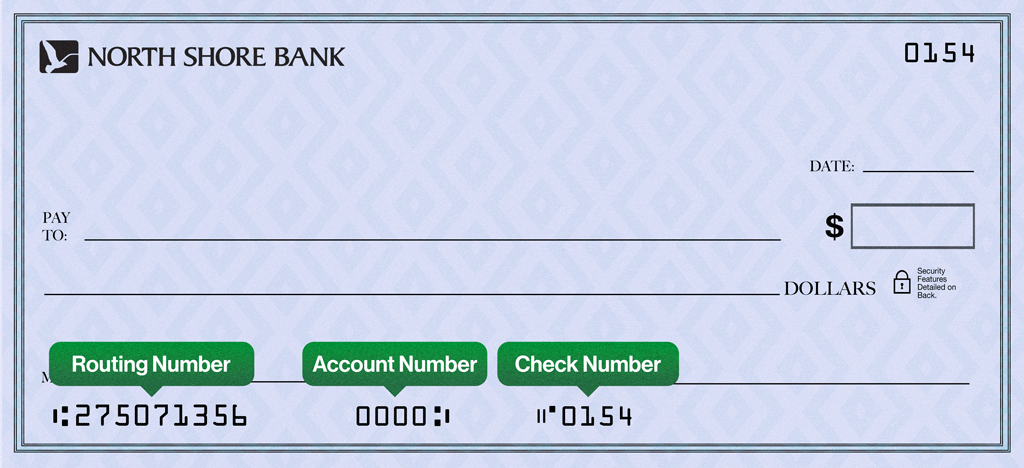
To set up a transfer from your checking account at another bank, you will need your current bank's routing number and account number. Typically, this information is found on a printed check, deposit ticket or account statement.
Using a prepaid card to fund a new account is highly discouraged. In most cases it does not contain the necessary information required to successfully fund an account. Please visit a North Shore Bank location to open the account.
Depending on how the processing of your application proceeds you will receive additional emails:
- More Information Needed For Your Application (Pending) - this email instructs you to contact us to gather additional information.
- Welcome to North Shore Bank! - Confirms that your new account is open. NOTE: This email contains your new account number. Your account number is the Application ID number.
- Please Validate Your Account - Communicates the steps to take to make your initial deposit to your new account.