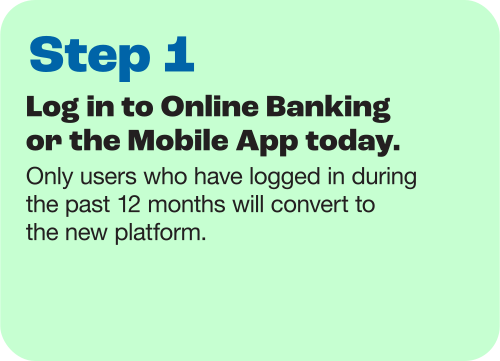
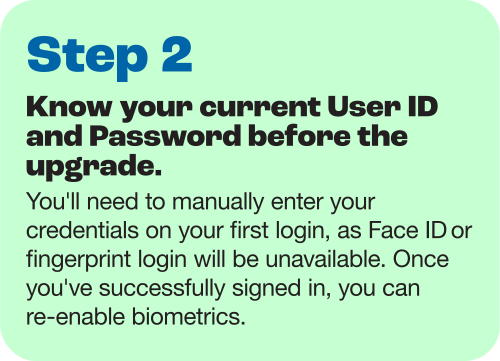
Login Credentials | - Keep your current login. Your User ID and Password will remain the same, so there is no need to re-enroll.
- User access will remain unchanged. Existing user permissions and entitlements will automatically transfer to the new platform.
- Token Users: Beginning Monday, October 26, users can sign in using biometrics and multifactor authentication (MFA) through a phone call or text message. Customers who wish to continue using hard or soft tokens should contact Treasury Management for assistance as a new soft token app will be required.
|
Business Online Banking | Business Online Banking will be unavailable starting at 6 pm on Friday, October 23. You won’t be able to access Business Digital Banking until the upgrade is complete. A different login experience for business customers. Starting Monday, October 26, the URL for desktop access will change and existing bookmarks will no longer work. Business customers will log in directly from North Shore Bank’s home page at northshorebank.com. From the Login menu, click on the Business tab, and enter your User ID and Password.
|
Business Mobile App | - The Business Mobile App will be unavailable starting at 6 pm on Friday, October 23.
- Delete the Business Mobile App. Before logging in after the upgrade, remove the North Shore Bank Business Mobile App from your device.
- Download the new North Shore Bank Mobile App starting Monday, October 26. Search for “North Shore Bank” in Apple’s App Store® or Google Play™.

- One app, separate logins. You’ll use the same North Shore Bank Mobile App, but personal and business accounts will continue to have separate User IDs and Passwords.
- Enable Face ID or Touch ID. After your first manual login, you can enable biometric login.
|
Mobile Deposit | |
Remote Deposit Capture (RDC) | - Remote Deposit Capture will be unavailable starting at 6 pm on Friday, October 23, until the upgrade is complete.
- No changes to Remote Deposit Capture. RDC will continue to operate as it does today and can be accessed through Deposit Checks in the desktop version of Business Digital Banking.
- Allow pop-ups for RDC access. Because RDC opens in a separate browser window, please allow pop-ups from North Shore Bank in your browser settings.
|
Account Alerts | - Account alerts will be unavailable starting at 6 pm on Friday, October 23. You won't be able to create new alerts during this time, but alerts established before the upgrade will continue to be delivered.
- Your existing alerts will transfer. Current alert settings will carry over to the new platform.
|
Internal Transfers | - Transfers will be unavailable starting at 6 pm on Friday, October 23.
- Scheduled transfers will carry over. Existing recurring and future-dated internal transfers will transfer to the new platform and will be visible to all account holders.
- Loan payments will continue as scheduled. Existing loan payments set up through Pay Your Loan or Business Online Banking will continue without interruption, unless you have not logged in within the past 12 months.
|
Business Bill Pay | - Business Bill Pay will be unavailable starting at 6 pm on Friday, October 23, until the upgrade is complete.
- Scheduled payments will still be processed. Future-dated payments scheduled before Business Bill Pay becomes unavailable will process as planned.
- Your Business Bill Pay information will transfer to the new platform. This includes existing payees, payment history, recurring payments, and scheduled payments.
|
Positive Pay | - Positive Pay will be unavailable starting at 5 pm on Thursday, October 22, until the upgrade is complete. During this time, you won’t be able to upload issued checks or view activity.
|
ACH Manager | - Schedule ACH transactions to occur before Monday, October 26. ACH transactions cannot be scheduled with an effective date after Monday, October 26, in the current Business Online Banking system.
- ACH Manager will be unavailable starting at 6 pm on Friday, October 23, until the upgrade is complete. During this time, you won't be able to view or manage ACH activity.
- Save your ACH history. ACH history will not transfer to the new platform so be sure to download any history you may need, up to 90 days, before the upgrade begins. If you reuse old history items to initiate ACH activity, we recommend you utilize the "save as template" option before the upgrade so you can more easily issue ACH after the upgrade.
- Save your ACH templates. ACH templates will transfer to the new platform, however, as a best practice, be sure to download and save your templates before the upgrade begins.
- Recurring ACH transfers will automatically carry over to the new platform. You may receive an email notification when this transfer occurs.
- The process may look different. ACH functionality will remain the same, but some tasks may be completed a little differently in the new platform.
- ACH processing times will remain the same.
|
Wire Manager | - Wire Manager will be unavailable starting at 6 pm on Friday, October 23, until the upgrade is complete.
- Save your wire history. Wire history and recurring wires will not transfer to the new platform. Be sure to download any history you may need, up to 90 days, before the upgrade begins.
- Wire templates will transfer. Existing wire templates will automatically carry over to the new platform.
- The process may look different. Wire functionality will remain the same, but some tasks may be completed a little differently in the new platform.
- Update payee addresses. After the upgrade, the payees addresses within a template will convert but need to be manually updated to format the city, state, and zip. Not doing this manual update will cause rejected wire transfers.
- Wire cut-off times will remain the same.
|
Intuit QuickBooks® | - QuickBooks users should back up their data before Friday, October 23, and download their latest transactions.
- QuickBooks will continue to be supported in the new platform using Direct Connect, Express Web Connect, or Web Connect.
- Reconnect your accounts after the upgrade.On or after Monday, October 26, you'll need to deactivate and reactivate your banking connection in QuickBooks. View step-by-step guidance on reconnecting your accounts:
- Express Web Connect (Aggregation Services) Interruption. Users who have linked their bank accounts to Intuit may experience an interruption for up to 5 business days after go-live on October 26. During this time, we recommend downloading a QFX/QBO file.
|
 FDIC-Insured - Backed by the full faith and credit of the U.S. Government