Will I still receive a paper bill in the mail with eBills?
Once you request to receive eBills from a business, you will no longer receive a paper bill. However you can print a paper copy of any eBill, if you prefer.
FAQs
Once you request to receive eBills from a business, you will no longer receive a paper bill. However you can print a paper copy of any eBill, if you prefer.
No, you will not be charged a fee for making a payment through the online loan payment service.
This is an invitation for you to explore the convenience and benefits of receiving your bill at the same place where you currently pay your bill. During this introduction you will be provided with an electronic bill while continuing to receive a paper bill. If you like the convenience of electronic billing you can decide to stop receiving paper bills.
Most businesses use the same billing cycle as mailed bills, so you can expect to receive your bill at approximately the same time of the month that you currently receive your paper bill – without the postal delay.
You can pay an eBill just like any other online bill payment. Or you can choose to have your eBills paid automatically with Auto-Pay (under a certain dollar amount).
Once you request to receive eBills from a business, you will no longer receive a paper bill. However you can print a paper copy of any eBill, if you prefer.
No, you will not be charged a fee for making a payment through the online loan payment service.
This is an invitation for you to explore the convenience and benefits of receiving your bill at the same place where you currently pay your bill. During this introduction you will be provided with an electronic bill while continuing to receive a paper bill. If you like the convenience of electronic billing you can decide to stop receiving paper bills.
Most businesses use the same billing cycle as mailed bills, so you can expect to receive your bill at approximately the same time of the month that you currently receive your paper bill – without the postal delay.
You can pay an eBill just like any other online bill payment. Or you can choose to have your eBills paid automatically with Auto-Pay (under a certain dollar amount).
Bill Pay can only be used with a checking account. You must also enroll in Online Banking or the Mobile App to access Bill Pay.
Message and data rates may apply when using the Mobile App.
The maximum-allowed payment through the online loan payment service is $4,000.
The daily cut-off time to submit a payment is 5:30pm Central.
Payments made after 5:30 PM on Friday through the weekend (Saturday and Sunday) will be processed on Monday. The payment will be timestamped with the date that the payment was submitted on.
For example, when you make a payment on a Saturday, it will be posted with that day as the payment date, even though the payment is part of the Monday process.
eBills are an important part of North Shore Bank’s Bill Pay. These documents are simply bills delivered electronically to you, rather than mailed.
When registering online to pay your North Shore Bank loan or mortgage, you will need to provide the following information
- The loan or mortgage account number for the loan you are making a payment on
- The account number and routing number of the account you will be using to fund your payment.
It’s important to make sure both numbers are accurate to ensure a smooth payment process.
When you register for the online loan payment service, you are able to establish login credentials that will grant you additional functionality, such as setting up recurring payments. If you choose not to register, you can still submit a payment after validating select information. Examples of this information include your account number, last name, address, zip code, last four digits of your Social Security Number (SSN).
There is no cost to use Bill Pay for personal accounts.
Log in to your account on the Mobile App or Online Banking and select Pay Bills or Payments to get started.
Watch our Bill Pay video tutorial.
Message and data rates may apply when using the Mobile App.
There is no charge for setting up and receiving eBills through North Shore Bank's Bill Pay.
Your bills, statements, and notices are available online for six months from their arrival date.
- Payments to payees who accept electronic payments are delivered in approximately two business days.
- Payments issued by check are delivered by mail in approximately five business days.
- When you schedule a payment, the payment calendar indicates the earliest available payment date.
Payments can be set up as much as 365 days in advance. Recurring payments can be scheduled to occur over any timeframe in the future, including indefinitely.
When you log on, you will see the number of new eBills, statements, and notices you’ve received. You will also receive a reminder email to notify you of new eBills in your account mailbox if they have not been viewed within four days of delivery.
Enrolling in eBills is simple. Log in to your account our Mobile App or within Online Banking. From the Bill Pay page, choose from a list of Billers that offer eBills (indicated by the eBill icon). Just click the eBill icon next to the Biller name and follow the on-screen prompts to complete enrollment.
Log in to your account on the Mobile App or Online Banking and select Pay Bills or Payments to get started.
Watch our Bill Pay video tutorial.
Message and data rates may apply when using the Mobile App.
Lease payments cannot be made through the online loan payment service.
Once you sign up and create an account with our online loan payment service, you will be able to scheduling recurring payments.
With home-based loans, you will not be able to use our online loan payment service to pay off your Home Equity Loan or Mortgage loan. Instead, you will need to contact Customer Support at 877-672-2265 to request the payoff amount.
Yes, you can change a scheduled payment at any time before it is processed. The system displays an error message if you attempt to modify a payment after it has been processed.
Bill Discovery will automatically connect you with your eligible bills by searching the biller database and if you consent, your credit bureau data. Once the bills are located, you can add them to your list of bills in one click. Bill Discovery greatly reduces the time it takes to set up Bill Pay and reduces the chance of manual input errors.
Bill Discovery will continually search for new bills and alert you if new bills have been found.
Bill Discovery is available in both Online Banking and the Mobile App.
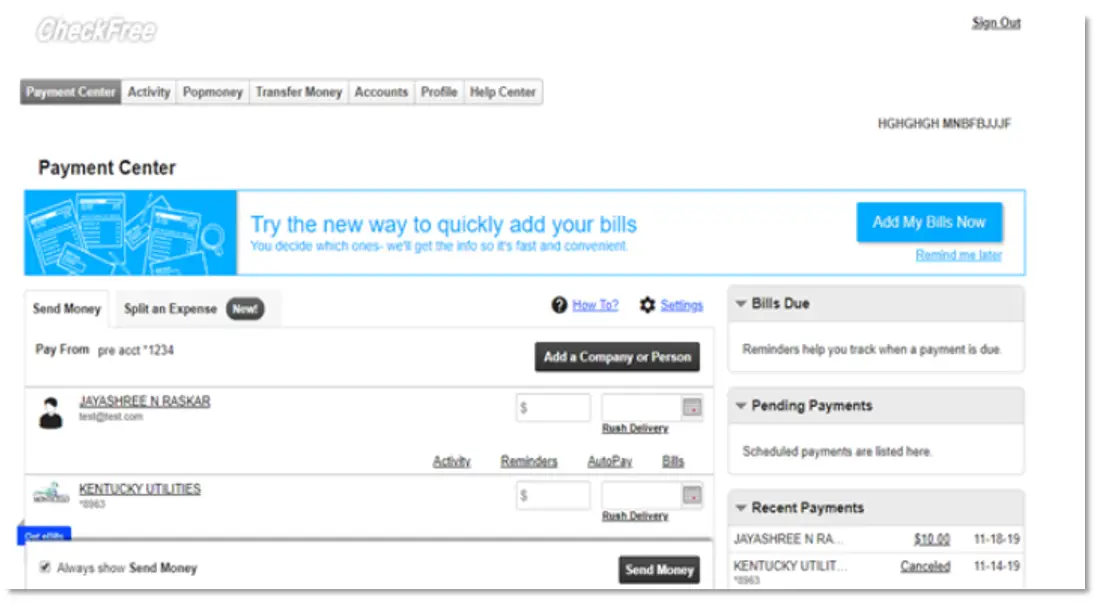
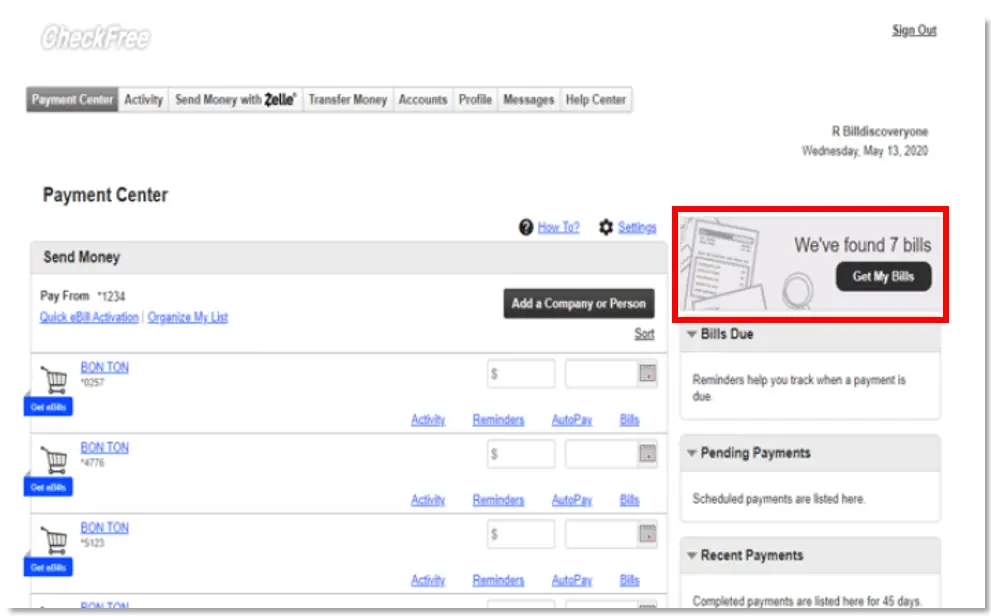
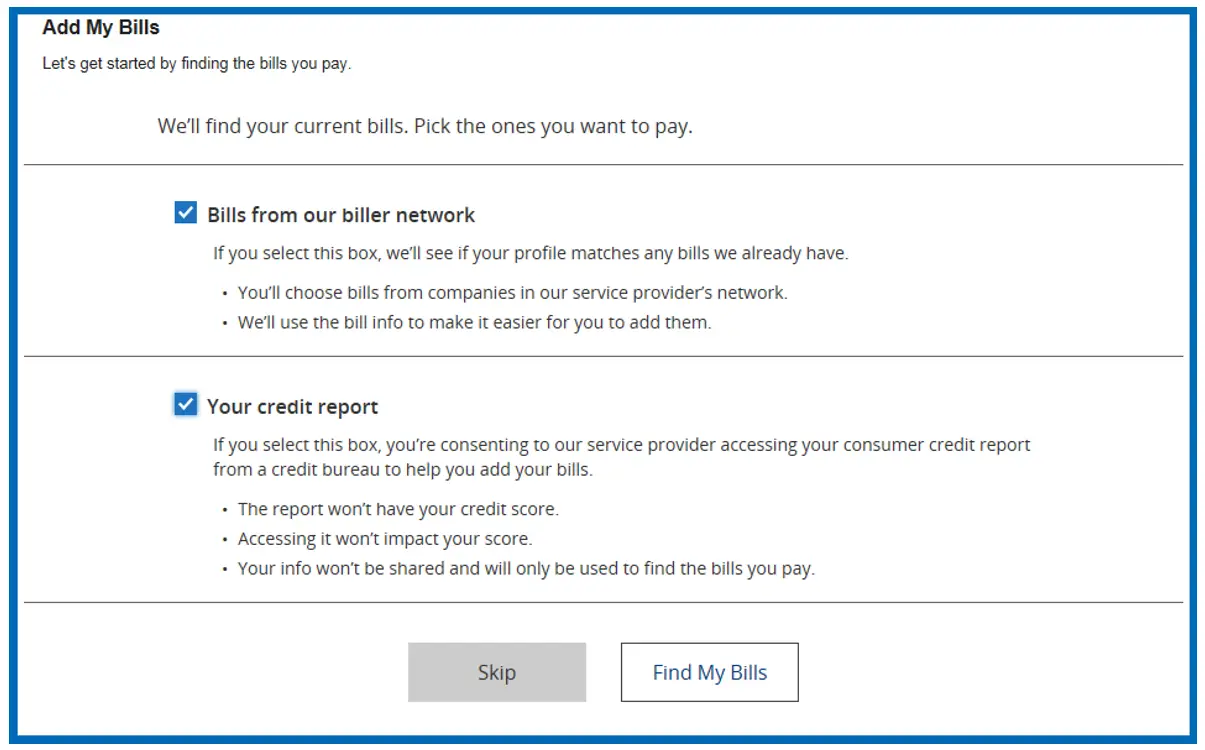
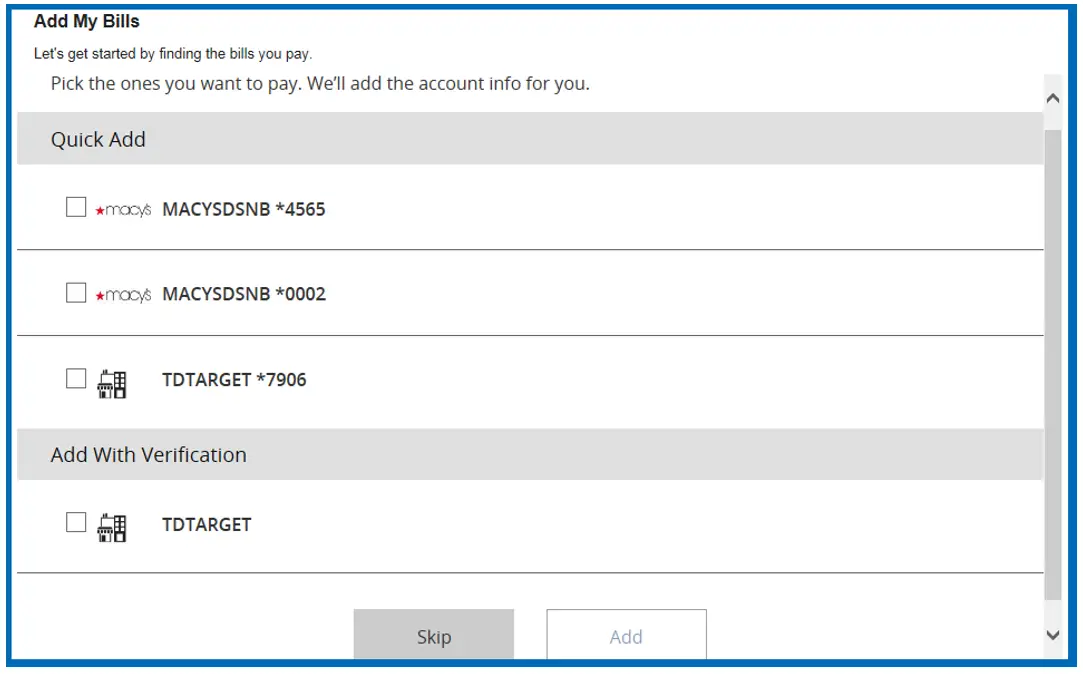
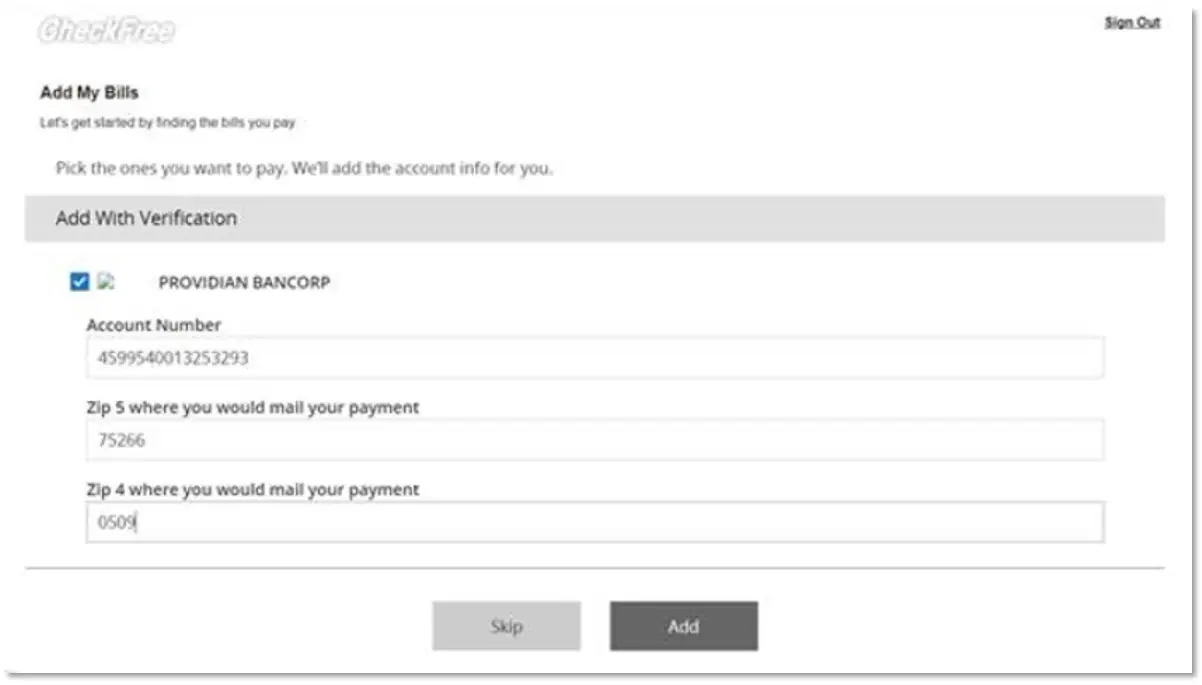
The following are screenshots of how you can set up and use this feature.
You first must consent to have your bills be found through the biller database and your credit bureau data. If you wish to have your credit data used, it is a soft inquiry and your credit score will not be impacted.

Once you provide consent and click Find My Bills, you will be presented with a page of potential payees.

If biller(s) require additional verification upon selecting the biller, you will be provided with the additional verification fields. If the biller does not require any verification then you can add those directly by clicking the Add button.

If you are not yet using Bill Discovery, you may see the following banner ad to begin using the feature.

After initial entry into Bill Discovery, new billers found among billers from the biller network or in your credit report will appear in the top, right area of your window. When clicking “Get My Bills”, you will be walked through the process of adding your bills in the same manner as the initial setup.